

Ecommerce platforms use AI for product recommendations to turn product details and shopping signals into relevant suggestions. The goal is practical: help a shopper choose the main item, add a useful accessory or answer a question before buying. Store records and merchant rules decide which options qualify.
Choose that job before choosing a model. Alternatives help someone who is still weighing the main product; a matching accessory fits a later choice. Upsello brings this work into a store conversation. Its Shopify assistant offers product guidance, upsell and cross-sell, and help with buying questions. This guide connects the general methods to that documented workflow and a focused test.
Key takeaways
- Start with the buying decision and the product facts needed to support it.
- Combine learned suggestions with checks for fit, stock and merchant rules.
- Evaluate Upsello where product choice and buying questions belong in one store conversation.
- Match each placement to a goal and KPI, then test against the current experience.
- Treat attributed sales as a diagnostic; use a controlled test to assess added value.
How ecommerce recommendations work
AI recommendations learn patterns from product information or shopper feedback. Manual selections specify the items a merchant wants to show; fixed rules specify conditions for showing them. A store can combine these approaches. For example, Shopify distinguishes manually selected recommendations from generated suggestions. Shopify recommendation controls
A common learned system separates three jobs:
- Find candidates: Retrieve a pool of products that could suit the current shopper or product context.
- Rank the options: Score candidates against the system's chosen objective and available signals.
- Apply final controls: Filter or reorder the list for further requirements, such as eligibility, freshness or variety.
Google describes this candidate-generation, scoring and re-ranking structure. It is a general architecture, rather than a description of Upsello's underlying model. Google's recommendation architecture
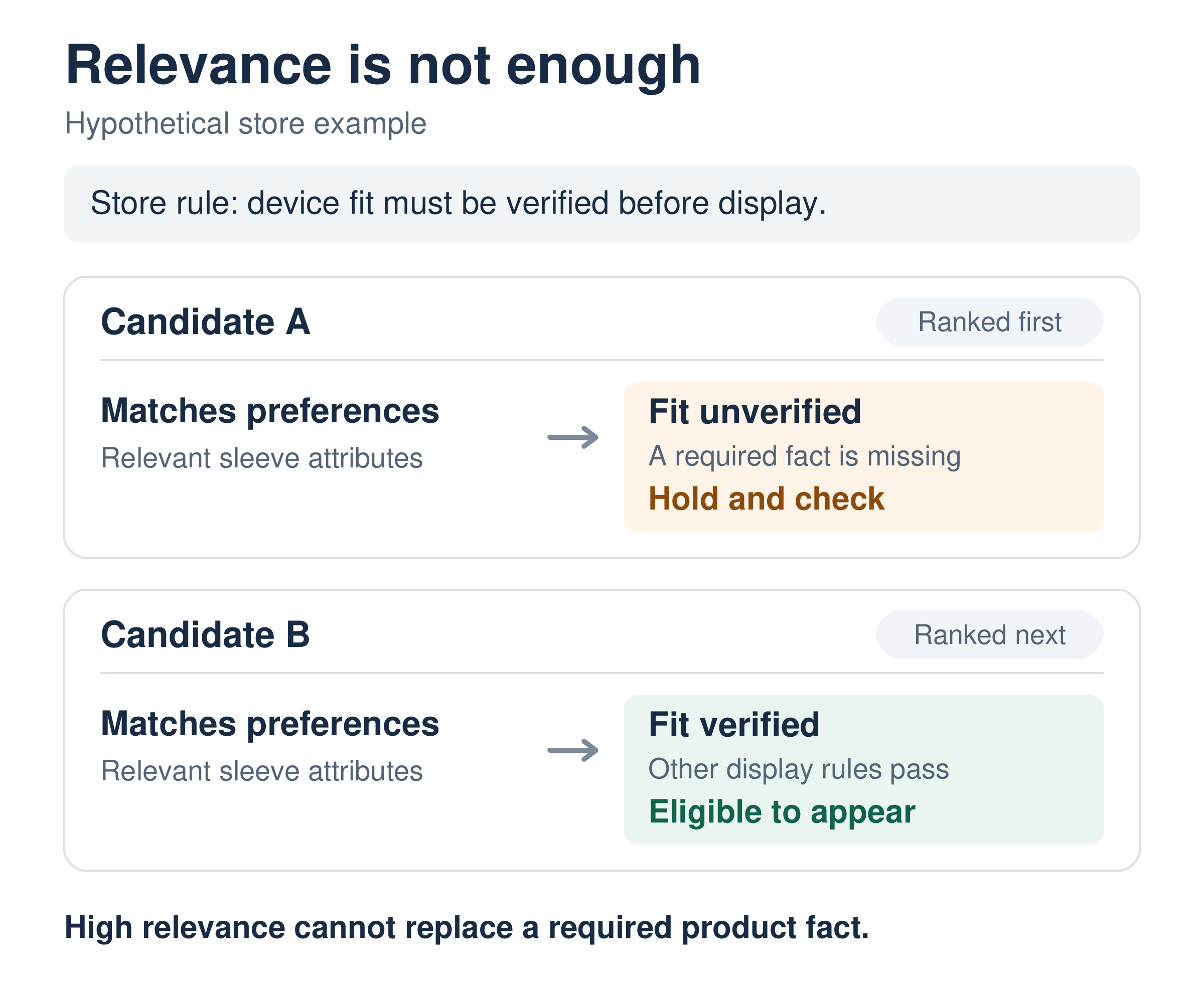
The separation gives a merchant a way to locate a problem. If a suitable item never enters the list, inspect retrieval and product data. If it appears below weaker choices, inspect ranking. If an unsuitable item reaches the shopper, inspect the rule and source used to check it.
Keep the commercial task visible through all three jobs. A system seeking alternatives needs a different definition of relevance from one finding an accessory for an already selected item. Define that distinction before choosing the model or judging its output.
The main recommendation methods
Choose a method around the signals you have and the decision it must support. These approaches can work together; a product's AI label tells you less than its input requirements and fallback behavior.
| Approach | Main input | Useful application | Limit to check |
|---|---|---|---|
| Content-based | Product features and stated or observed preferences. | Find items with relevant attributes. | Weak catalog fields and a narrow view of existing interests. |
| Collaborative | Feedback across users and items. | Learn relationships from shopping patterns. | Sparse feedback and new products absent from training. |
| Hybrid | More than one candidate source, with shared controls. | Combine behavioral signals with product features. | Each route still needs a clear job and final eligibility checks. |
Google's guides explain content-based filtering, collaborative filtering and multiple candidate sources. The new-item limitation above applies to a basic collaborative model; a specific service may add ways to handle it.
Embeddings represent products or queries as numeric vectors for comparing similarity. Both content-based and collaborative designs can use them. This retrieval mechanism is separate from generating a conversational answer. Google on embeddings
For a merchant evaluation, ask which fields or events drive the suggestion, what happens without enough history and which rules can change the result. The answer should connect the method to an inspectable shopping decision.
Put recommendations where the buying decision happens
Match the suggestion to the shopper's next decision. A related product helps compare alternatives; a complementary product can complete the selected purchase. Shopify supports these distinct recommendation types on compatible product-page themes. Shopify's recommendation guidance
Use this placement plan to connect the shopping goal with a proposed measure:
| Placement | Goal | Example | Proposed pilot KPI |
|---|---|---|---|
| Home or category page | Support discovery. | Introduce relevant items from the range. | Click rate: visitors clicking a suggestion ÷ visitors shown the block. |
| Product-page recommendation block | Help choose the main item. | Compare suitable alternatives. | Cart rate: visitors adding a shown product ÷ visitors shown the block. |
| Product-page complementary block | Complete the purchase. | Show an approved matching accessory. | Attachment rate: main-item orders also containing the suggested accessory ÷ main-item orders, both after block exposure. |
| Upsello store conversation | Resolve a product-choice question. | Explain differences between suitable SKUs. | Cart rate: visitors adding a shown SKU ÷ visitors shown chat recommendations. |
| Configured recovery flow | Address a buying objection. | Clarify a return-policy concern. | Assigned-group purchase rate: visitors placing at least one order ÷ assigned eligible visitors. |
Multiply each ratio by 100 to report a percentage. The click, cart and attachment rates diagnose interaction with a placement. The assigned-group purchase rate evaluates an outcome across the eligible group. Confirm the required events and definitions during setup; these are proposed measures, not a list of automatically recorded dashboard metrics.
Upsello describes product guidance based on shopper questions, browsing behavior and purchase intent. Its published capabilities include explanations of fit and tradeoffs, complementary products, bundles, upgrades and recovery help. This makes a connected product-choice workflow worth evaluating when the decision needs both merchandise guidance and an answer to a buying question. Upsello's shopping assistant
Consider a hypothetical Upsello pilot for laptop sleeves. First, a shopper needs a sleeve for a particular device and prefers a certain fabric. The workflow should check the device and sleeve dimensions in approved product records, compare eligible SKUs and explain the relevant difference. A broad label such as “fits most laptops” is insufficient to confirm the exact match.
After the main choice, the flow could present a cable pouch or documented bundle that serves the same purchase. The merchant should define the relationship and the offer rule. The goal is a useful addition, rather than an unrelated item chosen to enlarge the basket.
If a return-policy question stalls the decision, use the approved policy information to answer it. A configured recovery flow may address that objection; a person should handle a deciding fact the store cannot verify. This is an illustrative workflow to test, not a customer case or a report of achieved sales.
Set up an Upsello pilot with usable store data
Scope the pilot around one category and one buying problem. Assign an owner to the facts that settle the choice and to the rules that govern the response.
Upsello's Shopify integration documents store authorization and syncing. It lists catalog and variant data, stock, promotions, order status and return policies. Merchants can configure greetings, escalation and offer rules, then preview conversations before publishing to the theme. Its docs identify a theme chat widget. Confirm the supported placement for your store. A theme widget alone does not establish support inside every checkout. Shopify integration, Upsello docs
For the chosen category, review the exact variant, price, stock and deciding attributes. In the sleeve workflow, check device dimensions, usable sleeve dimensions, material, accessory relationships and the return policy. A title or a similar description can lead you to a product record. It should not replace a missing fit measurement.
Use the preview to test an ordinary request, a changed requirement and a missing fact. Check the SKU shown, the reason given and the next action offered. Resolve a catalog error at its source. If the required fact remains unknown, define the narrower answer or human question that should replace a confident match.
Test sparse and changing data
Try the flow with a new visitor, a newly added product and a stock or price change. Ask which fallback appears before enough history exists and how updated facts reach the response. Update behavior is service-specific. AWS documents differences by data type, import route and recipe. AWS on new data
For this pilot, test category context, stated needs or curated items as fallback options. Check whether a new item is missing because it has no history or because a store rule excludes it. Those require different fixes. Review the actual store behavior before expanding the category or traffic.
Set merchant boundaries and the human route
Upsello documents dashboard guardrails, preferred wording and human handling of complex cases. Define the offer and escalation rules needed by this category, then check their behavior in preview. Upsello's merchant-control FAQ
Limit data fields and permissions to the shopping task and measurement purpose. Name who approves each source and what happens when facts conflict. This is an operating plan for the pilot. It gives your team a concrete basis for reviewing recommendations and the questions that still need a person.
Measure recommendation performance beyond attributed sales
Upsello's docs list session-level conversion, recovery GMV and satisfaction analytics. They also show conversation and attribution webhook examples, including order.attributed. Confirm the definitions, attribution window and events available for your setup before using these outputs. A sale linked to an assistant interaction helps describe the journey; it does not establish how many extra sales the experience caused. Upsello's analytics documentation
For accessories and bundles, track average order value alongside attachment. Shopify defines AOV as (gross sales − discounts) ÷ orders, excluding post-order adjustments. Check margin and returns separately before treating a larger basket as a better result. Shopify's reporting definition
Test one defined change against the current experience. For example, keep the existing sleeve browsing route as the baseline and offer the scoped Upsello workflow to a randomly assigned eligible group. Compare the assigned groups, including people who never open chat. Comparing only chat users with other visitors would mix the product's effect with shoppers' choice to seek help. Microsoft on A/B testing
Set one primary outcome before launch and retain the same eligibility rules. Use the placement rates to diagnose where people click or add items, while the assigned-group purchase outcome answers a broader business question.
The following is hypothetical arithmetic, not an Upsello or customer result. Assume each of the 40 control orders and 48 test orders comes from a distinct visitor:
| Measure | Current experience | Test experience |
|---|---|---|
| Assigned eligible visitors | 1,000 | 1,000 |
| Orders | 40 | 48 |
| Conversion calculation | 40 ÷ 1,000 = 4.0% | 48 ÷ 1,000 = 4.8% |
The absolute difference is 0.8 percentage points: 4.8% minus 4.0%. The relative difference is 20%: (4.8% − 4.0%) ÷ 4.0%. Those are different descriptions of the same fictional comparison. The arithmetic alone establishes neither statistical significance nor a lift forecast.
Alongside the main outcome, review wrong-fit suggestions, missing or stale facts, returns or cancellations where relevant, and requests for human help. Check assignment and exposure logging before interpreting differences. Plan the sample and duration around the baseline and the smallest effect worth acting on. Microsoft's experiment-planning guidance
Read the results beside the conversations. A shopper who reaches the right product but remains unsure about returns needs different work from one shown the wrong sleeve. Use that distinction to choose the next catalog, rule or workflow change.
Choose one buying problem for the next step
Begin with a recurring choice your team can explain and measure. Define the product fact or buying question that holds the shopper back. Then choose the smallest useful flow. A native product block may be enough for a straightforward complement. Upsello is worth evaluating when product guidance and a buying answer belong in the same store conversation.
Our guide to how AI shopping assistants work explains the broader operating model. It shows how an assistant connects the request, store information, product selection and a permitted next step.
To discuss your own workflow, talk to Upsello. Share your store URL, category and one repeated product-choice question. Use the discussion to clarify the data needed, supported placement, merchant controls and the task a focused pilot should test.


